
Digital indicator field guide
Corner adjustment and digital load cell checks on truck scales
The mechanical side of a digital truck scale is much the same whatever hardware you use: the foundation has to be sound, the platform has to sit evenly on every load cell, the signal wiring has to be correct, and each load cell address has to be recorded. What changes from one digital indicator to the next is how you go about correcting the corners.
On indicators such as the MK-Di01, DS1, D2002E or DS8, a technician can do more than run a span calibration. You can read the state of each individual load cell, look at how the platform load is distributed, change the corner coefficient, and trace faults directly from the front panel.
This article is about how to think through corner adjustment on a digital truck scale, using the D2002E and DS1 as worked examples. The point underneath it is simple: check the mechanics and the load distribution before you touch a parameter, and calibrate and re-check with a real test load once the corners are done.
| Digital Load cell signal |
ISN Load distribution |
K factor Corner coefficient |
Stable Before confirm |
One scale, but every indicator gets there differently
| Indicator / system | How corner adjustment is handled |
|---|---|
| Traditional analog scale | Corners are trimmed in the junction box with potentiometers. The technician cannot read the condition of an individual load cell, because the signals have already been summed before they reach the indicator. |
| XK3190-DS1 | You enter the digital load cell positions and change the corner parameters by hand on the indicator. This suits work where you want control over each load cell position and want to move in small increments. |
| D2002E | Puts the emphasis on reading the ISN of each load cell, checking how the platform load is spread, and the corner coefficient K. It offers both manual and automatic corner adjustment. This is a useful way of separating a mechanical fault from a parameter problem. |
| DS8 digital indicator | Handles calibration, corner adjustment, axis adjustment, load cell management and data communication. Aimed at truck scales built on newer-generation digital load cells. |
Load cell layout and addressing come first
In a digital truck scale every load cell carries its own address. During installation, write down the physical position of each load cell and where its cable lands in the junction box. It makes fault finding, corner adjustment and later maintenance far quicker.
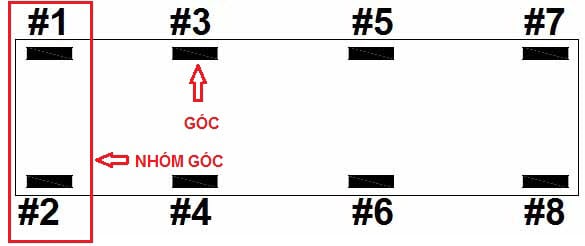
Example of digital load cell placement on a truck scale.
On an 8 load cell scale, the pairs (#1, #2), (#3, #4), (#5, #6), (#7, #8) are usually checked as corner groups or axle groups. On a 6 load cell scale, expect the centre cells to carry more of the platform weight than the ones at the ends.
The lesson from the D2002E: read ISN before you touch K
The D2002E documentation has the technician check the ISN value of each load cell before any corner adjustment. ISN can be read as how much of the platform weight is currently resting on that cell. If an ISN reading looks wrong, sort out the mechanics before going near the K factor.
| What you check | What it tells you |
|---|---|
| ISN of each load cell | Shows how the deck is bearing on each cell. A cell taking far too much or far too little load usually points to shims, the bearing surface, the mechanics, or a deck that is not sitting straight. |
| End cells versus centre cells | On a long deck the centre cells can carry more platform weight than the ones at the ends. That is not necessarily a fault if it matches how the deck is built. |
| Readings that sit well outside the group | If one ISN is much higher or lower than the cells in the same position group, go back and check the load cell installation, the shim plates, the bearing surface and how flat the deck is. |
The rule worth keeping: do not use the corner coefficient K to paper over a mechanical fault. If the deck is not bearing evenly, a load cell cable is wired wrong, or a cell is in the wrong position, adjusting K only makes the scale harder to keep stable over time.
Worked example: ISN distribution on a six load cell deck
The D2002E documentation works through a 60 tonne deck measuring 3.4 x 14 m, with an unloaded deck weight of roughly 10 tonnes on six load cells. When the ISN values are read, the end cells come out close to each other while the centre cells carry noticeably more.
Load cell positions on a 60 t deck: cells 1 and 4 at one end, 3 and 6 at the other, 2 and 5 at the centre joint.
| Load cell | 1 | 2 | 3 | 4 | 5 | 6 |
|---|---|---|---|---|---|---|
| ISN | 1290 | 2460 | 1310 | 1240 | 2520 | 1180 |
In this example load cells 1, 3, 4 and 6 are the end group and their readings sit close together. Cells 2 and 5 are at the centre, so their values run higher, close to double the end group. That is an acceptable distribution if it matches how the deck is built.
Two ways to correct the corners on a digital indicator
| Method | How it works | When to use it |
|---|---|---|
| Manual corner adjustment | The technician selects a load cell address or a corner position, reads the current value, and moves the K factor in small steps. | When you want control over each position, when only one or two corners are out, or when fine tuning after a field check. |
| Automatic corner adjustment | The indicator asks for the number of load cells and the test load, then you place that load on each corner in turn and confirm. | When you need to save time. You still need a proper test load, the right sequence, and a settled scale before each confirmation. |
On the D2002E the K factor normally starts at 1.00000. When adjusting by hand, keep each change small, for instance no more than 0.0010 at a time. If the reading is higher than the real load when the weight sits over one corner, reduce the K factor of that load cell; if it reads lower than the real load, increase it.
Always let the scale settle before you confirm
Whether you are on an MK-Di01, DS1, D2002E or DS8, the rule does not change: only confirm once the scale has settled. Press Enter or Input while the reading is still moving and the indicator can record the wrong figure, which leaves the corner adjustment out.
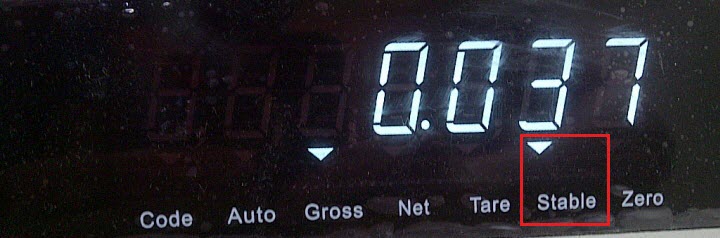
Where to find the Stable lamp on an XK3190-DS1 indicator.
A field procedure worth following
| Step | What to do |
|---|---|
| 1 | Check the foundation, bearing surfaces, shim plates, check rods, load cell cables and the junction box before touching the indicator. |
| 2 | Record each load cell address against its real position on the deck, and confirm the indicator is seeing all of them. |
| 3 | Read the ISN or the status of every load cell. If the load distribution looks wrong, fix the mechanics before adjusting any corner coefficient. |
| 4 | Run a vehicle or test load on and off the deck a few times so the bearing points settle before you calibrate. |
| 5 | Calibrate zero and span, then check each corner with the same test load. |
| 6 | Move the corner coefficient in small steps. After every change, re-check at the same load position and write down what you changed. |
| 7 | When you are done, re-check several positions across the deck, save the parameters, and show the operator how to watch for drift over time. |
What usually goes wrong
| Symptom | Likely cause | Where to look |
|---|---|---|
| Corners read differently | Corner parameters not right, uneven foundation, something fouling mechanically, or load cells not sharing the load evenly. | Check the mechanics, read ISN, test each load position, then trim the corner parameters in small steps. |
| Reading will not sit still | Load has not settled, signal noise, poor earthing, a faulty signal cable, or damp connections. | Wait for Stable, then check the A/B lines, earthing, junction box, power supply and the status of each load cell on the indicator. |
| Still out however much you adjust | Probably mechanical: the deck is not bearing evenly, a load cell is in the wrong position, or K is being used to cover the real cause. | Go back over the installation, the shims and mounting plates, bearing surfaces, check rods and the ISN spread before adjusting anything further. |
Points worth keeping in mind
| Correct installation and even load distribution matter far more than how much you adjust on the indicator. | |
| Write down the original K factor or corner parameters before you change anything. | |
| Change a little at a time, and re-check straight away with the same test load. | |
| After corner adjustment, recalibrate, or at the very least re-check zero, span and the error at several points on the deck. |
Hardware referred to above
| Product | Where it fits |
|---|---|
| KDS-D / KDB-D digital load cell, 30 tf | Digital load cell for truck scales, with RS-485 communication and per-cell status readout. |
| DS8 digital weighing indicator | Digital indicator covering calibration, corner adjustment, communication and ticket printing on truck scale systems. |
| XK3190-DS1M indicator | Digital indicator for truck scales built on digital load cells, with corner adjustment done on the front panel. |
UNICELL Sensors
If a scale will not come into tolerance, send us the indicator model, the number of load cells and the deck size, the ISN or per-cell readings, and the corner error you measured with your test load. We will tell you whether we are looking at a mechanical problem or a parameter problem before you change anything else.